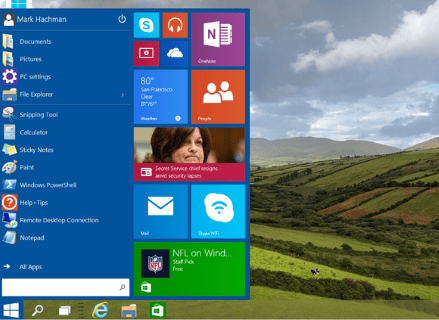
#10 Start Menu
On special public demand, the Start Menu is back. The menu features a search bar with Cortana integration (in regions where it’s supported) and customization space for pinning app shortcuts and live tiles. It looks similar to the traditional Start menu in form, which Microsoft discontinued with the Windows 8.

#9 Updated command prompt
Microsoft has done a very good job to please its users. Microsoft has pleased power users with some improvements in the command prompt interface. The command prompt now supports copy and paste keyboard shortcuts so you'll be able to use Ctrl+C, Ctrl+V commands easily.

#8 Windows Hello
Say Hello to new Windows Hello. Windows 10 introduces Hello a new way to authenticate users through face recognition on supported devices. You can also use a fingerprint sensor or other biometric sensors to log in to Windows. The feature makes use of Intel RealSense 3D camera with 3D depth-sensing.
#7 New Edge browser
No more Internet Explorer. Microsoft has replaced Internet Explorer with a new browser called Edge which features a minimalist, clean interface similar to Google's Chrome.

#6 One Windows version across devices, Continuum
Unlike previous Windows systems, Windows 10 runs on all devices across form factors, including phones, tablets, 2-in-1s and PCs. The OS will come with a feature called Continuum which detects when you remove a keyboard from a 2-in-1 and switch to a touch-optimised UI with big tiles. It will also have a universal app marketplace.

#5 Cortana
This is one of the most crucial features in Windows 8. One key feature of Windows 10 is Cortana, Microsoft's voice-based personal digital assistant. With Cortana, Windows catches up with Apple's iOS and Google's Android in a major way. Cortana can be accessed from the search box that's right beside the Start menu.
#4 Action Centre
With new windows comes a better Action center. With Windows 10 Microsoft has introduced a new space that displays alerts for new messages, email and notifications from social apps in addition to toggles for commonly used settings such as Brightness, Bluetooth, and power options.
#3 Universal search
This is kind of new in the start menu. The Windows 10 Start menu also features a universal search box (integrated with Cortana) similar to Apple OS X's Spotlight feature and offers web results in addition to results obtained by searching across files, apps and settings.
#2 Snap enhancements
Another good news. Users can now have up to four apps snapped on the same screen with what Microsoft calls a new quadrant layout. Windows 10 will also show other apps and programmes running for additional snapping and will make smart suggestions on filling available screen space with other open apps.

#1 Multiple Desktops, new Task view
The view will completely be new this time. With Windows 10, users can create virtual desktops for different purposes and projects and switch between desktops and pick up where they left on each desktop, similar to OS X's Spaces. There is a new task view that displays all open windows and desktops. This is also very similar to the Expose feature of Apple’s OS X.